
Floor · kitchen · bookings · margin
Floor and kitchen on the same thread.
The server orders at the table, the kitchen receives station by station and at its own pace, the booking finds its table, and every plate has its cost.
30-day online trial, no card.
The software
Three screens, taken from the application.
- Live service Register
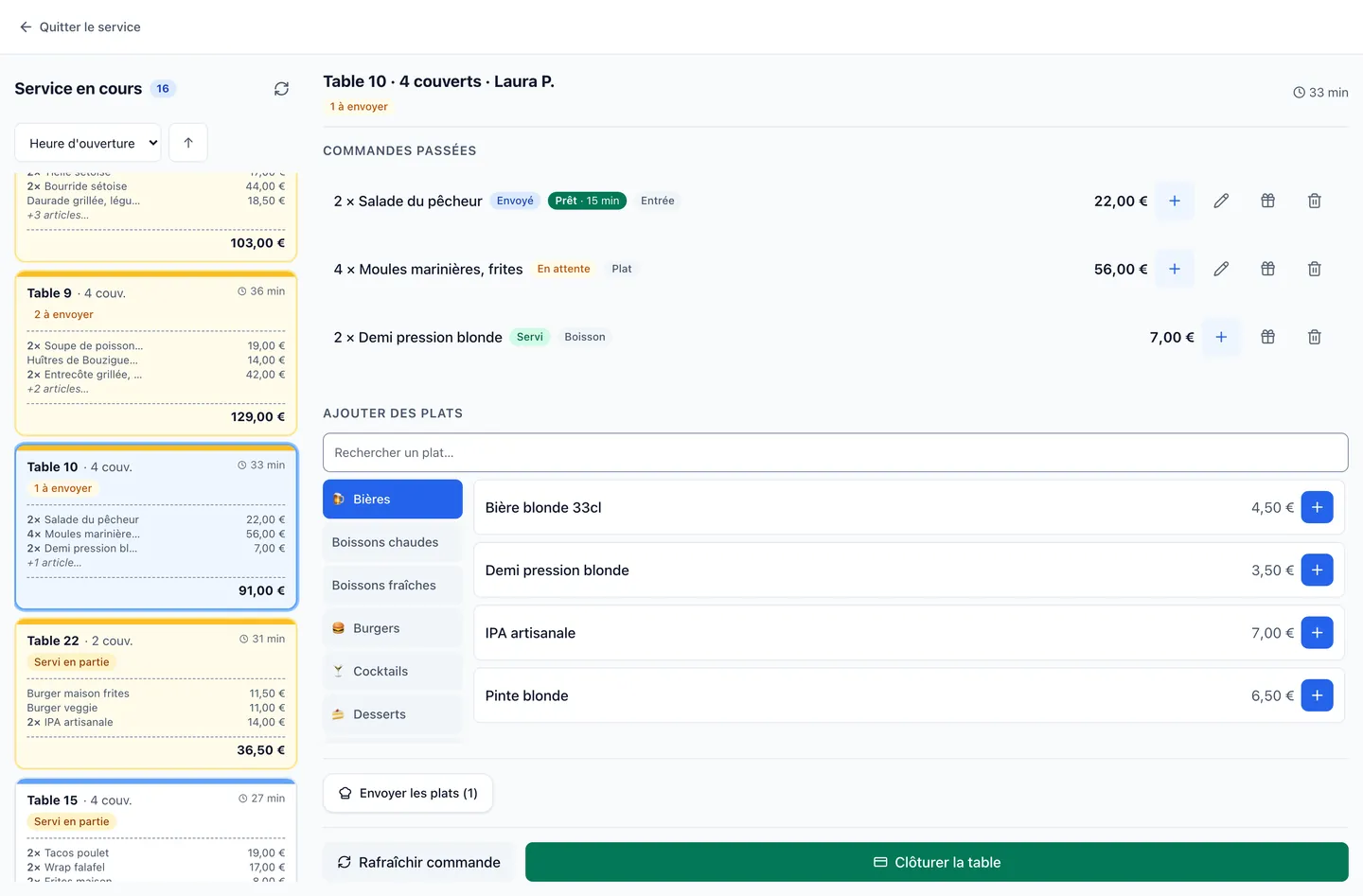
Service table by table: what has been fired, what is ready, what is served, and the dishes still to fire.
- Floor Register
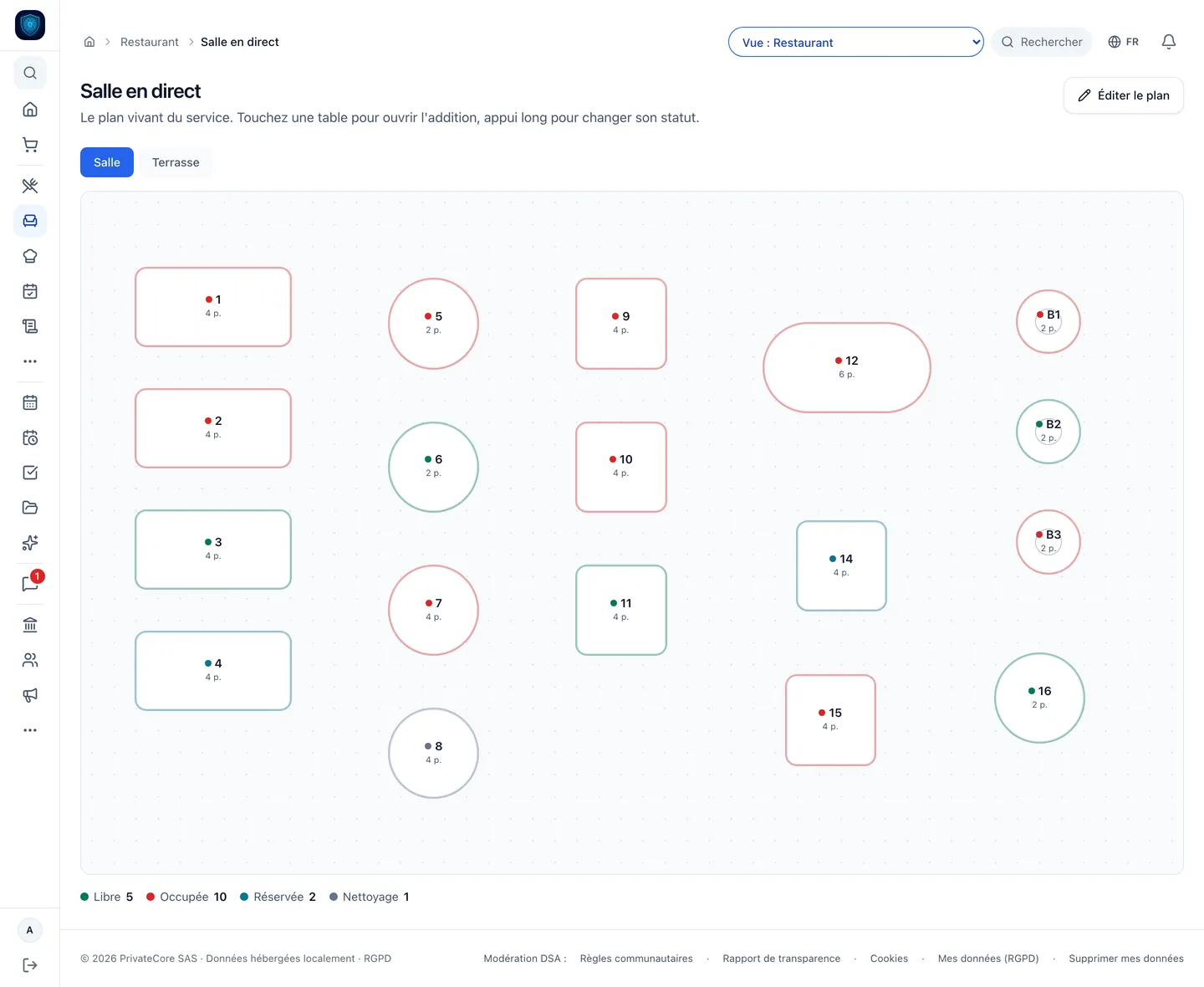
The live floor: every table, its seats and its state, free, occupied, reserved or to be cleared.
- Rota HR & payroll
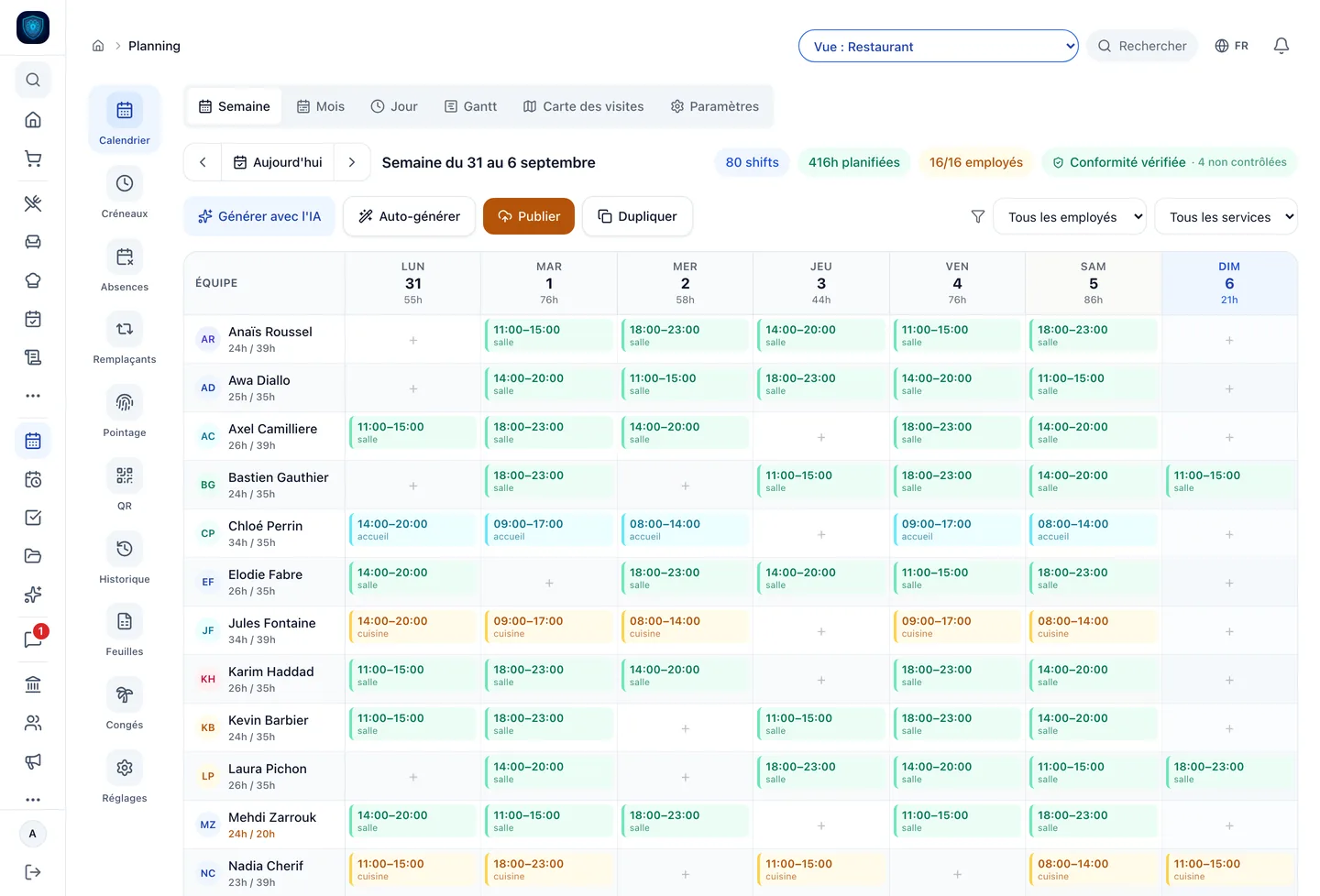
The brigade’s week: floor, kitchen, front desk, hours counted and compliance checked.
- Kitchen screen Register
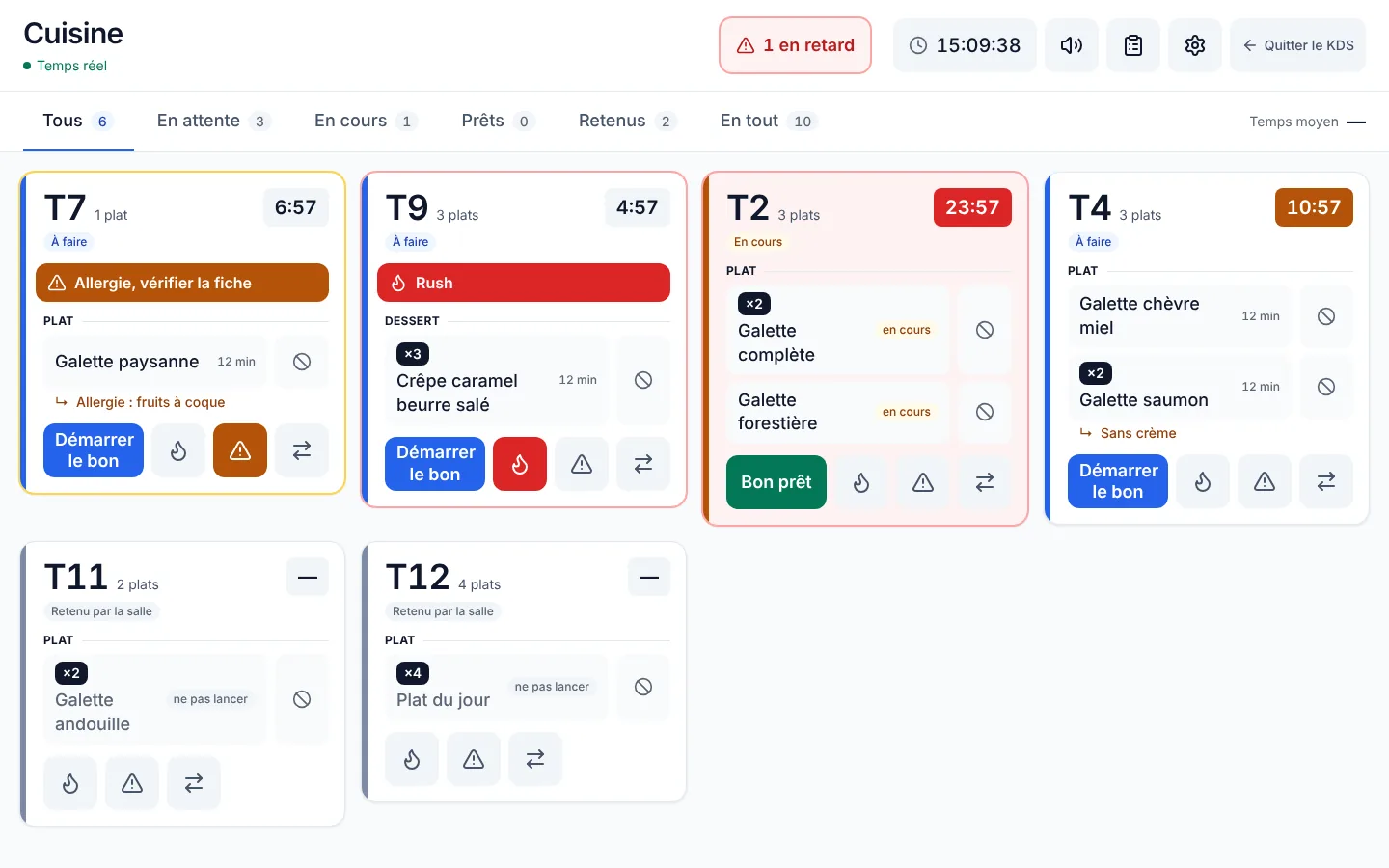
The kitchen screen: allergies and rush orders go first, a late ticket turns red, the floor holds back what must not go yet.
Real screenshots of the software · the data is that of a demonstration instance.
Your plan
RestoCore
8 modules tuned for this trade, switched on from day one.
- POS & HACCP
- Scheduling, HR & payroll
- Stock & omnichannel retail
- Appointments & bookings
- CRM & sales
- Quotes & Factur-X invoicing
- Accounting & FEC
- Dashboards & alerts
On your hardware
- iPad The till at the counter, order-taking at the table.
- iPhone The server’s pad at the table, the owner’s approvals.
Food, hospitality and leisure
Other trades in this family.
Each one has its own page, with its real screens and its price.
Where it hurts
Before, after.
-
« At 8:30 pm every table orders at once, and the pass overflows. »
The pass screen releases dockets at the pace you set per station: so many tables at a time, so many seconds between two.
Details
An allergy or a rush order always jumps the queue, and a docket held too long goes out on its own.
-
« Bookings live in a notebook, and I seat people by guesswork. »
On the phone, three taps: covers, time, name.
Details
The smallest free spot that fits the party is suggested, even when two have to be joined. The regular’s record comes up during the call: past visits, notes, no-shows.
-
« To comp a coffee, the server has to come and fetch me. »
The server asks from the pad, you approve on your phone with one tap in the notification, and the pad does it straight away.
Details
The approval holds only for that check, as you saw it, for 90 seconds.
-
« I have no idea what a plate costs me. »
The recipe sheet gives the ingredient cost and the margin of each recipe.
Details
The menu sorts itself into stars, puzzles and dogs, by what sells and what earns.
2 more pains we cure
-
« The starter leaves with the main, and the table waits in between. »
The server files each line under its course: starter, main, dessert.
Details
Starters go first, mains when the table is ready, and each line goes to the station that prepares it.
-
« The temperature log sits on top of the fridge, filled in when someone remembers. »
Each fridge has its limits.
Details
The reading is entered on the iPad, timestamped, and the latest one shows on the unit’s card. A reading out of range raises an alert that stays on screen until someone acknowledges it.
In detail
Everything that ships built in.
- Payments Viva.com
- Banking Qonto
-
Floor and server pad
- Live floor plan
- Ordering at the table
- Firing by course
Details
- Live floor plan: free, occupied, reserved, to be cleared
- Ordering at the table: on iPad or phone, each line goes to the station that prepares it
- Firing by course: starters, then mains when the table is ready
- Doneness and extras: doneness for the cook, the extra billed with its VAT
- Table transfer, check merging and splitting
- Sealed check: an evening served from the pad goes into the restaurant’s Z report
-
Kitchen and bar
- One screen per station
- Pass pacing
- Allergy or rush
Details
- One screen per station: kitchen, bar, pastry, each with its categories
- Pass pacing: so many tables at a time, so many seconds between two
- Allergy or rush: the docket jumps the pacing
- Late threshold per station: the docket turns red
- Dish out of stock: flagged from the kitchen, restored in one tap
- Average time per station, measured from the docket’s arrival
-
Table bookings
- Entry in three taps
- Table suggested
- Joined tables
Details
- Entry in three taps: covers, time, name
- Table suggested: the smallest free one that fits the party
- Joined tables: for one service or for good
- Regular’s record: visits, notes, no-shows
- Arrival and no-show logged in one tap
-
The owner, even away from the floor
- Remote approval
- Floor alerts
- Rights by role
Details
- Remote approval: comp or void, approved from your phone
- Floor alerts: a dish running late, a table left waiting
- Rights by role: runner, section waiter, head waiter, manager
- Caps and mandatory reason, set by you from the rights screen
- Service mode: table service, counter, guest QR, kiosk, banquet, and four more
-
Menu, QR and takeaway
- Translated menu
- Table QR
- Allergens
Details
- Translated menu: by the in-house AI, your own translations never overwritten
- Table QR: menu only, guest ordering or paying the bill, the restaurant’s choice
- Allergens: shown dish by dish, in the language the guest picks
- Paper menu read by the local AI to build the menu
- Takeaway: orders by time slot, a screen for orders ready
- Online payment: if you take payments with Viva, our payment partner
-
Margin and closing
- Ingredient cost and margin
- Stars, puzzles, dogs
- Portions still possible with the stock
Details
- Ingredient cost and margin: per recipe
- Stars, puzzles, dogs: the menu ranked
- Portions still possible with the stock
- Happy hour: the time-slot price set on the line
- Evening report, X and Z tickets, NF525 Ready POS
- Tips split, then paid through the payslip
- Card payment at the table: if you take payments with Viva, our payment partner, on the server’s iPhone
The math
What it replaces, and what it costs.
Based on a 12-employee restaurant. The 4 subscriptions below, brought together in one tool.
What the plan covers
- Team scheduling Skello €79 or Combo · Snapshift · Planday · Factorial
- NF525 POS Lightspeed €89 or L'Addition · Popina · Tiller · SumUp · Zelty
- Invoicing & cash flow Pennylane €49 or Tiime · Indy · Sage · Cegid
- HACCP & traceability ePackPro €119 or Octopus HACCP · Traqfood · Vericook
PrivateCore
RestoCore
€213 a month
4 subscriptions, one plan.
And what the usual stack does not cover
- Guest data at your place, on the Mac mini
Public prices as of August to October 2026, entry-level plans, options excluded. The vendors' prices change: check their sites.
The gap
What we centralise, and they do not.
-
How many tools
Bookings, pad, kitchen screen, QR menu and food cost read the same menu and the same floor plan.
Elsewhere Five tools that do not talk to each other.
Details
The dish ordered at the table is the one the kitchen sees and the margin counts.
A notebook or a platform for bookings, a POS, a kitchen screen, a QR menu, a spreadsheet for food cost: five tools that do not talk to each other.
-
When the internet drops
On the restaurant’s Mac mini, the pad, the kitchen screen and the POS carry on over the dining-room network.
Elsewhere The POS and the kitchen screen live on a distant server: no network, no dockets in the kitchen.
Details
Whatever has to go out leaves once the network is back.
-
What it costs you when you have a good season
A subscription that looks neither at your covers nor at your turnover.
Elsewhere A commission per booking, a fee per terminal, a surcharge per user: the harder you work, the higher the bill.
Details
Bookings are taken in-house, with no commission per party.
3 more differences
-
Where your data lives
On a machine sitting in your own premises.
Elsewhere On the vendor’s servers.
Details
The database is yours, it is backed up at your place, and nobody else reads it.
On the vendor’s servers. Your regulars, their numbers and your margins sit with a third party.
-
Artificial intelligence
The model runs on your machine.
Elsewhere The menu goes to an online translation service, and the photo of the paper menu to an AI vendor.
Details
It translates the menu and reads the paper menu to build it: nothing leaves the premises.
-
What a POS does not cover
Payslips, staff registers and the FEC export live in the same tool, fed by the same hours and the same tickets.
Elsewhere Payroll, staff registers and accounting fall outside the scope: other software, other exports.
FAQ
What we get asked.
How many covers a day can PrivateCore handle?
No software limit: the number of covers is not part of the price. An entry-level Mac mini runs a neighbourhood restaurant; for a very high-volume venue or several sites, we recommend a Mac Studio at installation.
Can a server comp or void without me?
Comping is reserved for the manager, and you decide by role who may void. The server asks from the pad, you receive the request on your phone with two buttons, Approve or Decline. If you approve, the pad does it within 90 seconds, and only if the check has not changed since you saw it.
How does kitchen-screen pacing work?
You switch it on station by station: at most so many tables in progress, and a minimum delay between two dockets. The next dockets wait their turn. An allergy or a rush order jumps ahead, the second dish of a table already fired joins it, and a docket held too long goes out on its own.
Can I log temperatures without a dedicated probe?
Yes. Readings are entered by hand on the iPad, unit by unit, against the limits you set. No special hardware is needed.
Do guests order themselves with the QR code?
If you choose so. The table QR has three settings, one at a time for the restaurant: menu only, the guest ordering from their phone, or the guest paying the bill the server opened. Online payment goes through Viva, our payment partner, if you take payments with them.
Is the menu translated for foreign guests?
Yes. The AI running on your Mac mini translates dish names and descriptions into English, Spanish, German, Italian, Dutch and Russian. The guest picks their language on the menu. Allergens show in their language, and a translation you corrected is never overwritten.
And restaurant VAT compliance (5.5 / 10 / 20)?
Each product has its VAT code. Eat-in, everything is 10%, alcohol 20%. Takeaway, it is 10% as well for whatever is eaten straight away, and 5.5% only for what keeps: sealed can or bottle, bread, pastry, yoghurt, fruit, packaged deli dish. The sale mode alone never sets the rate. An alcoholic extra moves the line to 20%. Correct VAT breakdown in the FEC.
Do I have to type my whole menu again?
No. Take a photo of your paper menu: the local AI reads it and you check the dishes before importing them. The floor plan is then drawn at installation, with you.