
Front desk · floors · direct booking · revenue
Every room, its state, its price.
Your website takes the booking with no commission, on the front desk planner. The floors follow every room, from dirty to inspected. And your pricing rules simulate the week’s rate grid.
30-day online trial, no card.
The software
Three screens, taken from the application.
- Front desk Front desk
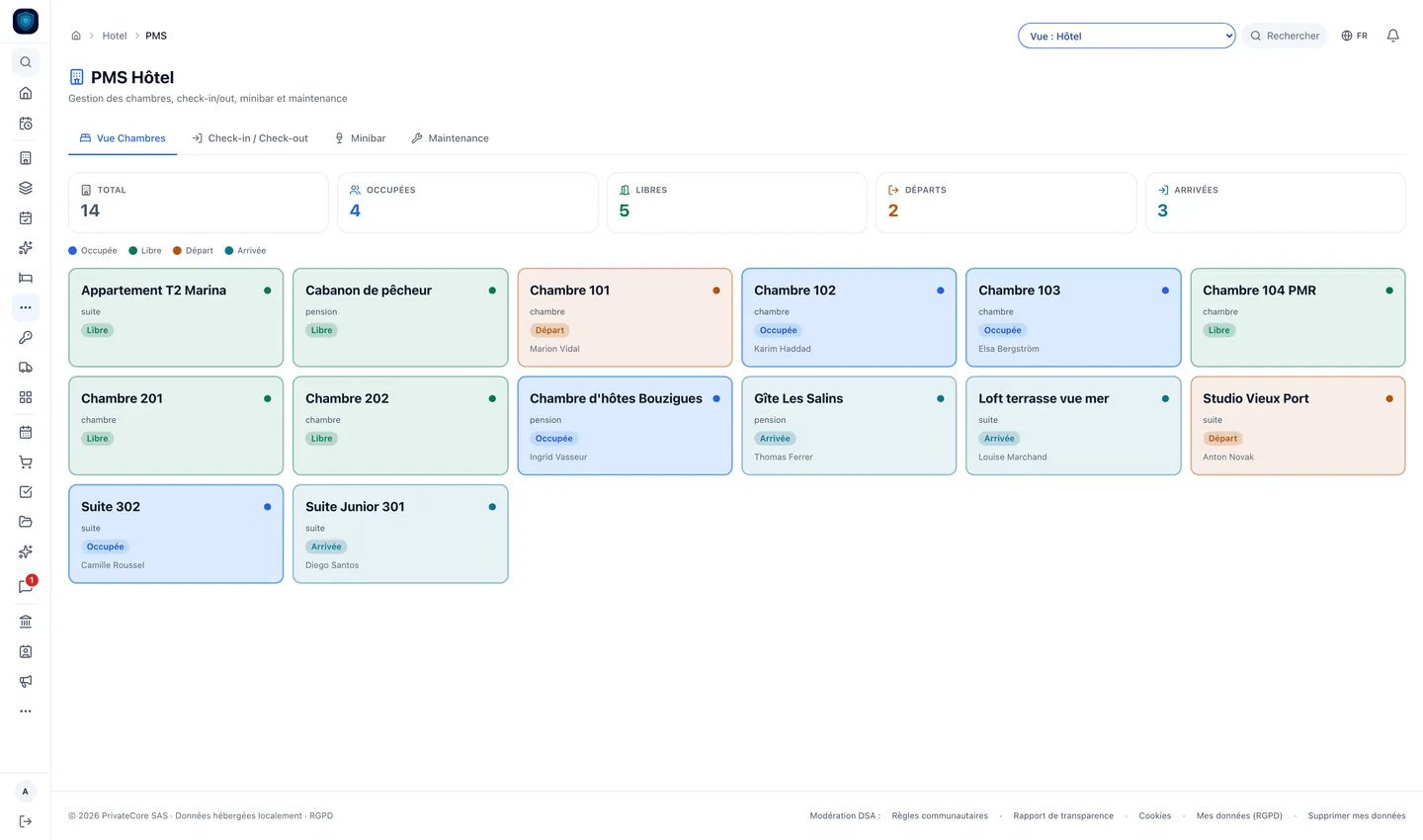
The front desk: every room occupied, free, departing or arriving today.
- Bookings Front desk
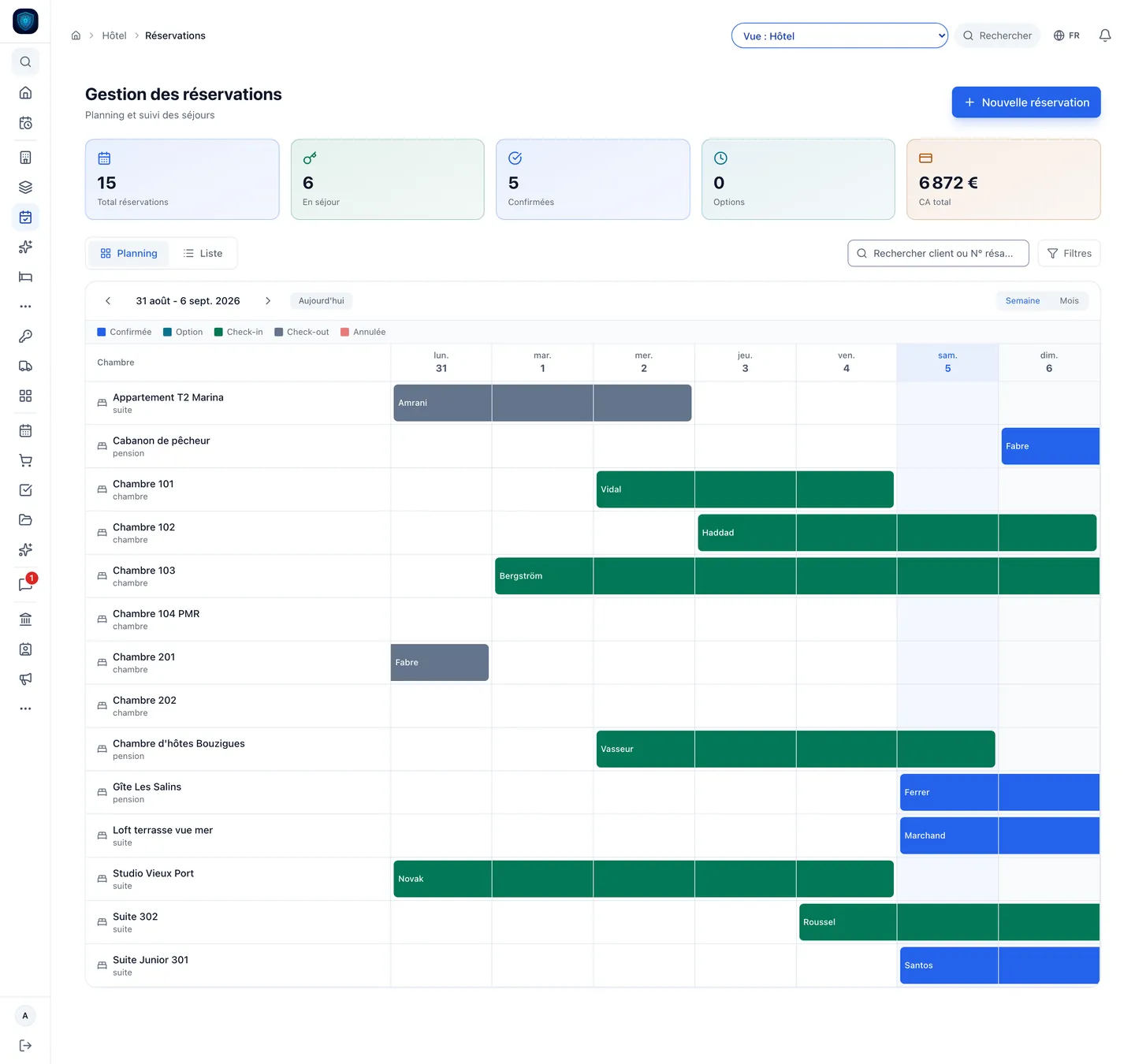
The stay planner, room by room: the same one your website bookings land on.
- Housekeeping Front desk
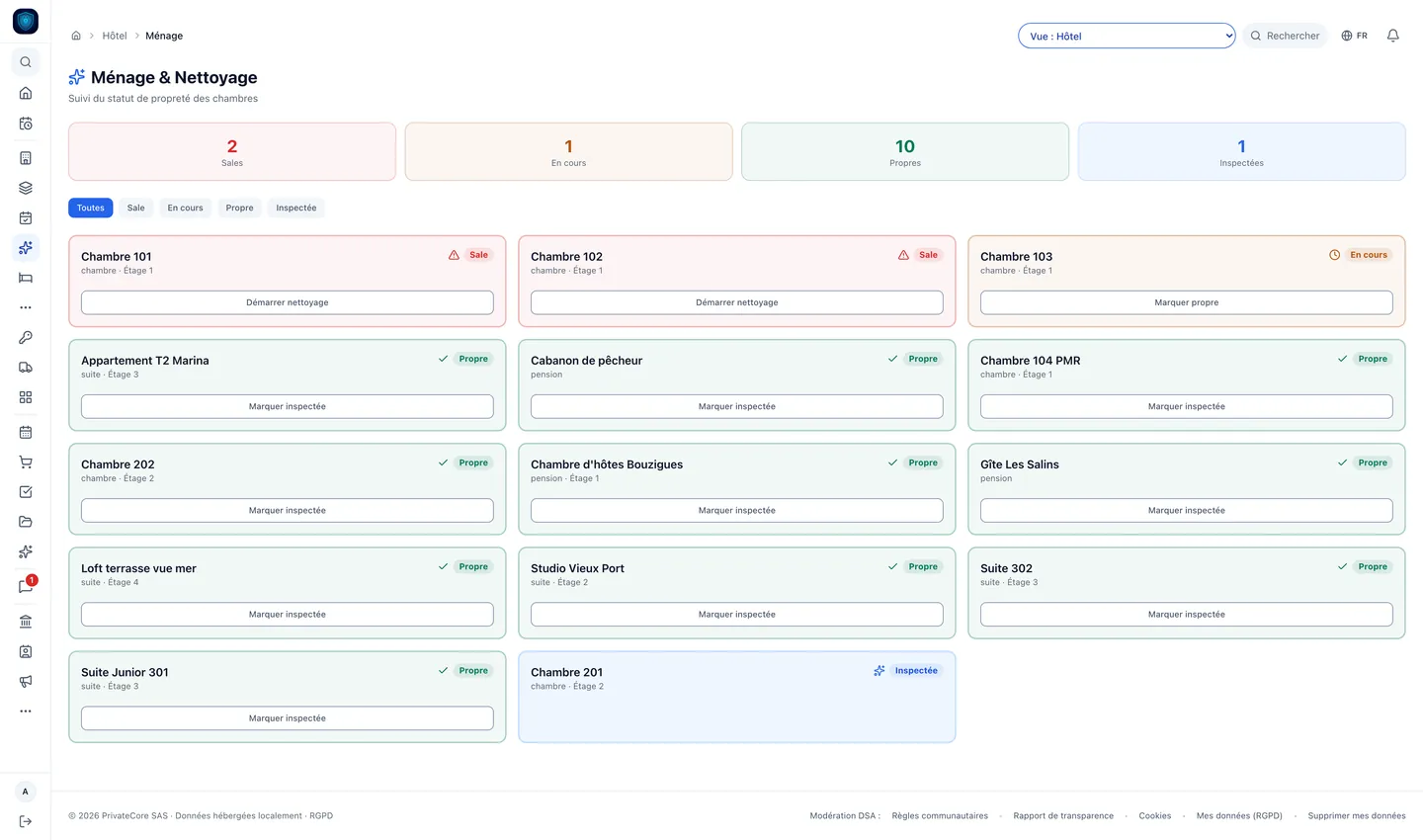
Housekeeping room by room: dirty, in progress, clean, inspected.
- Live floors Front desk
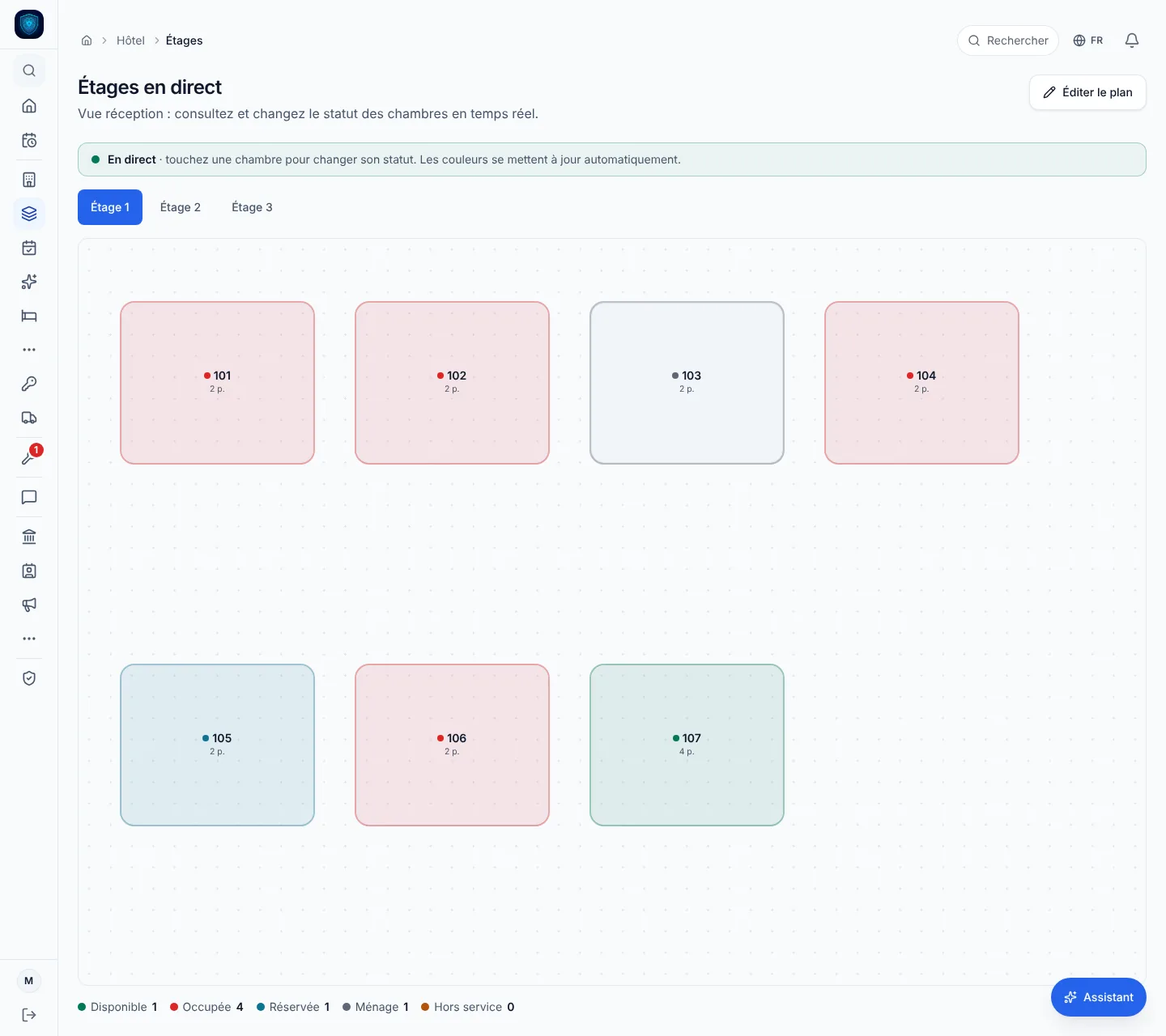
The plan of each floor: the room’s colour shows whether it is free, occupied, booked or being cleaned, and one tap changes its status.
- Dynamic pricing Front desk
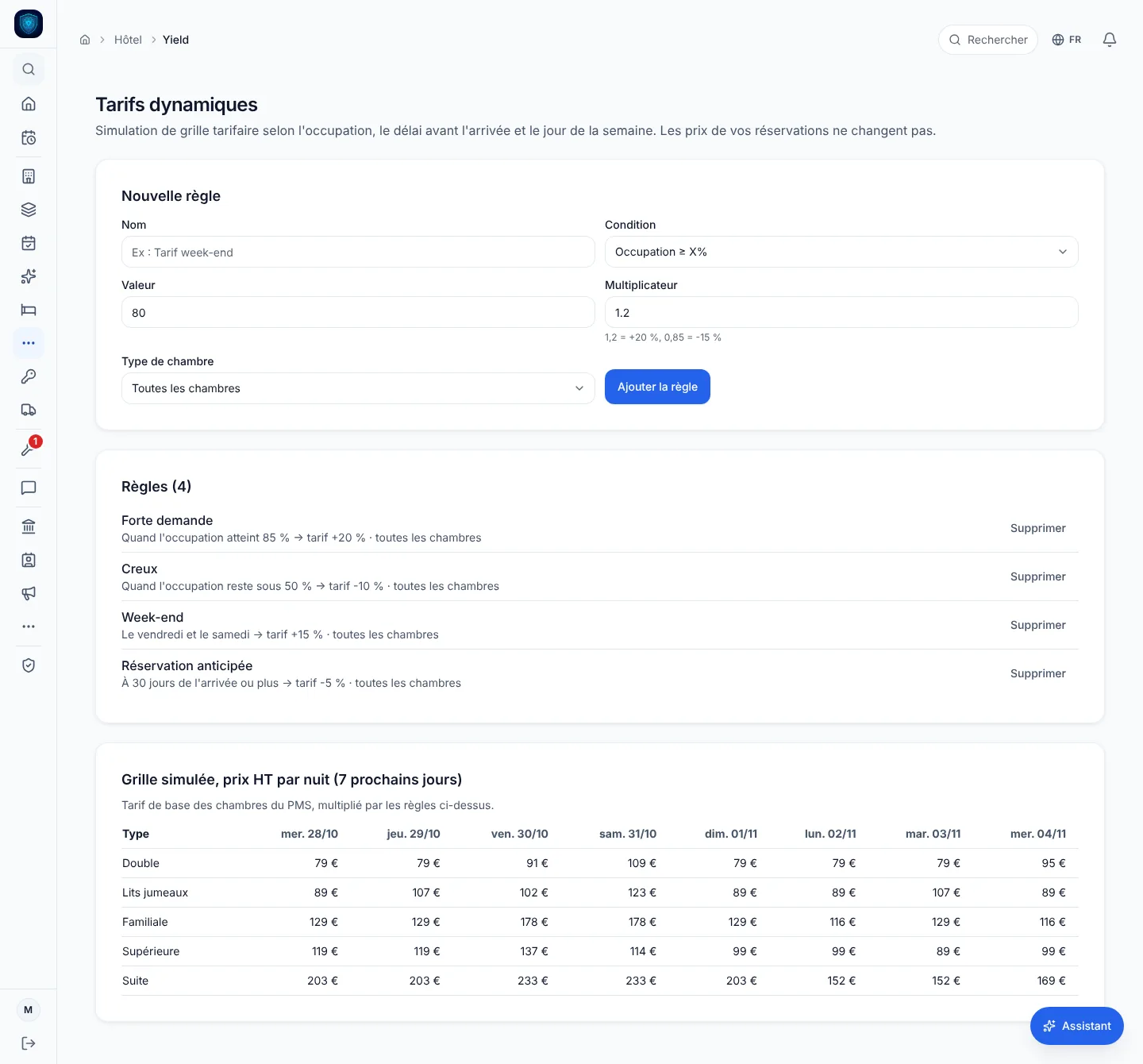
Your pricing rules by occupancy, weekend or booking lead time, and the grid of prices they give for the coming days.
- Revenue dashboard Front desk
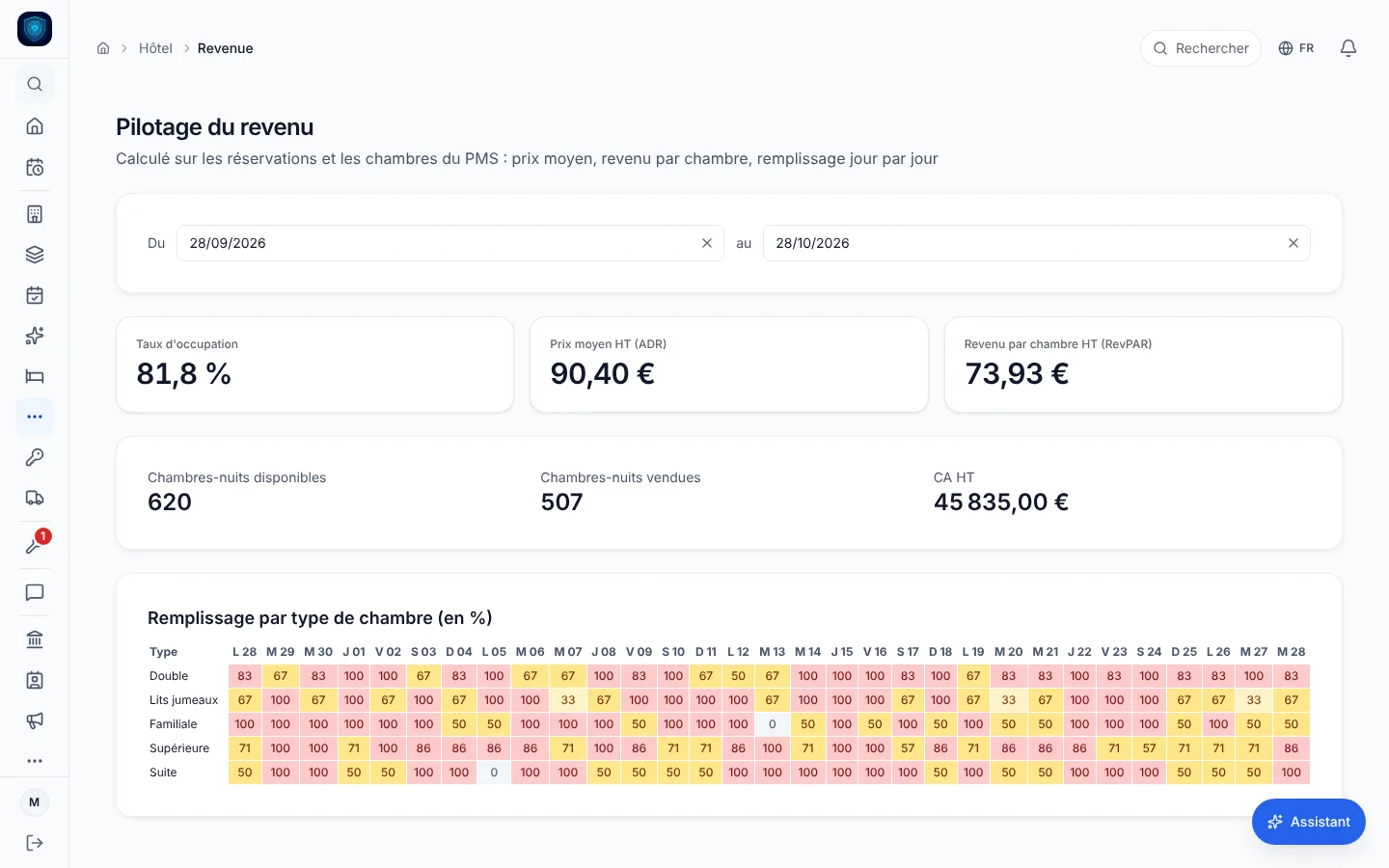
The month’s occupancy rate, average rate and revenue per room, with the fill of each room type day by day.
Real screenshots of the software · the data is that of a demonstration instance.
Your plan
HotelCore
6 modules tuned for this trade, switched on from day one.
- Hospitality: PMS & channels
- Scheduling, HR & payroll
- CRM & sales
- Quotes & Factur-X invoicing
- Accounting & FEC
- Dashboards & alerts
On your hardware
- iPad Front desk: check-in, check-out, folio.
- iPhone Housekeeping: rooms cleared from the corridor.
Food, hospitality and leisure
Other trades in this family.
Each one has its own page, with its real screens and its price.
Where it hurts
Before, after.
-
« The guest checks out at eleven, and I write down on a scrap of paper which room needs doing. »
The departure recorded at the front desk turns the room to dirty.
Details
The floor staff move it to in progress, clean, then inspected, and the housekeeping screen counts what is left to do.
-
« Everything goes through the platforms, and my website only has a contact form. »
A booking engine lives on your own website.
Details
Guests book without creating an account, availability is re-checked at the moment of confirming, and they cancel from their own link without calling the front desk. The request lands as pending on the front desk planner.
-
« I copy Booking and Airbnb reservations by hand. »
Paste the iCal address of each listing, tied to its room: the calendar is re-read every fifteen minutes and its stays are listed in the channels screen.
Details
They show up without blocking the room: you check before confirming the same dates.
-
« My rates are the same on a Tuesday in November and a Saturday in August. »
Set your rules: occupancy above or below a threshold, last minute, early booking, days of the week.
Details
Each one multiplies the base rate, and the grid for the next seven days is computed per room type. Nothing changes on its own: you decide the price.
4 more pains we cure
-
« I know whether the hotel is full. »
Over the period you pick: occupancy rate, average rate, revenue per available room, room nights sold and revenue.
Details
I know whether the hotel is full. I do not know whether it is profitable.
The occupancy map crosses room type with date: you see where it slips.
-
« The shower in room 12 leaks, and nobody at the front desk knows. »
The room goes out of service with a maintenance ticket: reason, priority, tracked as open, in progress, resolved.
Details
While the ticket is open, the rooms screen shows it out of service.
-
« The police register is a notebook at the front desk, filled in when someone remembers. »
The police register is a register in the tool: the individual form carries the eight boxes of article R611-42 of the French immigration code, and the register prints as a PDF.
Details
The hotel’s mandatory notices are listed with their legal reference.
-
« I schedule the night porter on instinct and hope it is legal. »
The rota flags overlaps and approved leave, warns below eleven hours of rest, checks night work, blocks a minor on nights and any week over forty-eight hours.
In detail
Everything that ships built in.
- Booking platforms Booking.com · Airbnb
- Banking Qonto
-
Front desk and rooms
- Room view
- Out of service
- Guest file
Details
- Room view: occupied, free, departures, arrivals of the day
- Check-in and check-out recorded at the front desk
- Out of service: maintenance ticket, priority, tracking
- Room types and units of the hotel in one place
- Guest file: stays, nights and amount spent
-
Floors and housekeeping
- Housekeeping
- Departure recorded
- Live floors
Details
- Housekeeping: dirty, in progress, clean, inspected
- Departure recorded: the room turns dirty by itself
- Floor plan drawn to the shape of your hotel
- Live floors: a status changed on the plan shows on the other open screens
-
Direct booking, commission-free
- Booking engine on your own website
- Guests cancel from that same link
Details
- Booking engine on your own website
- Guests book without an account and follow their stay from a link that opens only theirs
- Guests cancel from that same link
- Availability re-checked at the moment of confirming
- The request lands as pending on the front desk planner
-
Stay, extras and channels
- Extras and mini-bar charged to the stay
- Options catalogue
- Stay bill in the PMS screen
Details
- Extras and mini-bar charged to the stay
- Mini-bar read at departure, price of the day frozen on the line
- Options catalogue: upgrade, late check-out, breakfast, parking
- Stay bill in the PMS screen: lines, payments, balance, PDF invoice
- Booking.com and Airbnb iCal calendars re-read every fifteen minutes, listed apart from the planner
-
Revenue and dynamic rates
- Occupancy rate, average daily rate
- Occupancy map
- Pricing rules
Details
- Occupancy rate, average daily rate (ADR) and RevPAR over the period
- Room nights sold and revenue excluding tax
- Occupancy map: room type by date
- Pricing rules: occupancy, last minute, early booking, day of week
- Simulated grid for the next seven days, your rates never change on their own
-
Obligations and staff
- Police register
- Staff rota
Details
- Police register: individual form of article R611-42, register as a PDF
- Mandatory hotel notices listed with their reference
- Staff rota: rest, nights and minors checked
- Payslips and social filings from clocked hours
- Versioned hospitality wage scale, alert below the minimum
The math
What it replaces, and what it costs.
Typical case: independent 20-room hotel, 6 employees.
What the plan covers
- PMS (room planning) Mews €120 or Misterbooking · Cloudbeds · Thais · Oracle Opera
- OTA calendars on one schedule SiteMinder €89 or D-EDGE · Amenitiz · Cubilis
- Team scheduling Skello €42 or Combo · Snapshift · Planday
- Accounting & FEC Pennylane €49 or Tiime · Indy · Sage
- Guest CRM & follow-ups Experience Hotel €99 or LoungeUp · Revinate · Bowo
PrivateCore
HotelCore
€163 a month
5 subscriptions, one plan.
And what the usual stack does not cover
- Factur-X & Chorus Pro
- Guest data at your place, on the Mac mini
Public prices as of August to October 2026, entry-level plans, options excluded. The vendors' prices change: check their sites.
The gap
What we centralise, and they do not.
-
How many subscriptions
Front desk, floors, direct booking, revenue, staff rota and payroll, accounting: one management OS, one database, one subscription.
Elsewhere The PMS handles the rooms, another tool handles housekeeping, a third one handles the bookings taken on your own site, and seasonal payroll lives somewhere else again.
Details
The PMS handles the rooms, another tool handles housekeeping, a third one handles the bookings taken on your own site, and seasonal payroll lives somewhere else again. Every junction between two of them is billed, and the ones that do not exist get filled in by hand.
-
Where your data lives
The database sits on a machine behind the front desk.
Elsewhere A hotel file names people: who slept there, which nights, with whom.
Details
It is backed up at your place, and the hotel remains the only spot where the stay history exists.
A hotel file names people: who slept there, which nights, with whom. Hosted by a third party, it is administered by people you did not hire, in a country you did not choose.
-
When the internet drops
On a Mac mini, the management OS is inside the hotel, not at the far end of the line.
Elsewhere The PMS lives in a browser: the line goes down and the front desk has no room plan any more.
Details
A guest arriving at midnight is checked in, and the floors see the room change state. Only the exchanges with the outside world wait for the line to come back.
The PMS lives in a browser: the line goes down and the front desk has no room plan any more. The arrival goes on a notepad and gets re-keyed the next day.
2 more differences
-
What it costs you when you fill up
The amount moves with neither your occupancy, nor your room nights, nor the seasonal staff of July.
Elsewhere A cut of every booking, a fee that steps up by room bracket, one more user for every summer hire.
Details
You keep your bank; if you take payments with Viva, our payment partner, it is an option, never a condition.
The vendor invoice follows how full you are: a cut of every booking, a fee that steps up by room bracket, one more user for every summer hire.
-
What a PMS does not cover
Payslips and social filings start from the hours clocked at the hotel, and hiring a seasonal worker prepares their pre-hiring declaration.
Elsewhere A PMS stops at the room.
Details
The French hospitality branch scale is versioned by year: it knows the staff meal benefit and the public holiday uplift, and warns when a wage falls below the minimum for its grade.
A PMS stops at the room. The seasonal contract, the hiring declaration, the payslip, the staff meal benefit, the FEC and electronic invoicing are handled elsewhere, from the same hours keyed in a second time.
FAQ
What we get asked.
What's the difference vs Mews or Cloudbeds?
Your data stays on the hotel machine, not with a host. No per-room subscription, no commission on your direct bookings, and iCal import of your calendars is included.
How does the Booking.com connection work?
Via iCal import: you grab the calendar address exported by your Booking.com extranet, paste it into PrivateCore tied to its room, and the feed is re-read every 15 minutes. The reservations read show up in the channels screen. They do not block the room on your planner or on your website: check availability before confirming another stay on the same dates.
What happens if Booking.com has an outage?
Direct bookings keep flowing: the booking engine runs locally, on your premises. On the Booking.com side, reading the calendar resumes by itself once the feed is back.
Do dynamic rates change my prices on their own?
No. Your rules (occupancy, last minute, early booking, days of the week) multiply the base rate and give a simulated grid for the next seven days, per room type. A booking’s price only changes if you change it.
And the city tax?
Your municipality’s scale is entered in the City tax screen: INSEE code, year, rate per night and per person, cap on nights. It is applied to no stay: the tax is computed neither on bookings nor on invoices, and the declaration is prepared elsewhere.
I have a restaurant in the hotel: is the POS included?
No, the POS belongs to the Restaurants pack. In the PMS screen, a restaurant charge can be added by hand to the stay bill, as a Restaurant line. The POS does not post it to the room by itself.
My front desk is open 24/7: what happens if the machine fails at 3 am?
On a Mac mini, everything runs locally, so an internet outage changes nothing for check-in. If the hardware fails, the encrypted Time Machine backup restores onto a replacement machine: your data lives on-site, nothing to reinstall from a cloud. The full setup is detailed on the /securite page.