
Client portfolio, engagement letters, tax and payroll calendar, documents, fees
Every file followed, every deadline met.
One file per client with its tax regimes, its engagement letter and its tax and payroll calendar. Missing documents get chased, time spent becomes an invoice. Each file shows its signed fees against the time spent on it.
30-day online trial, no card.
The software
Three screens, taken from the application.
- Portfolio Accounting firm
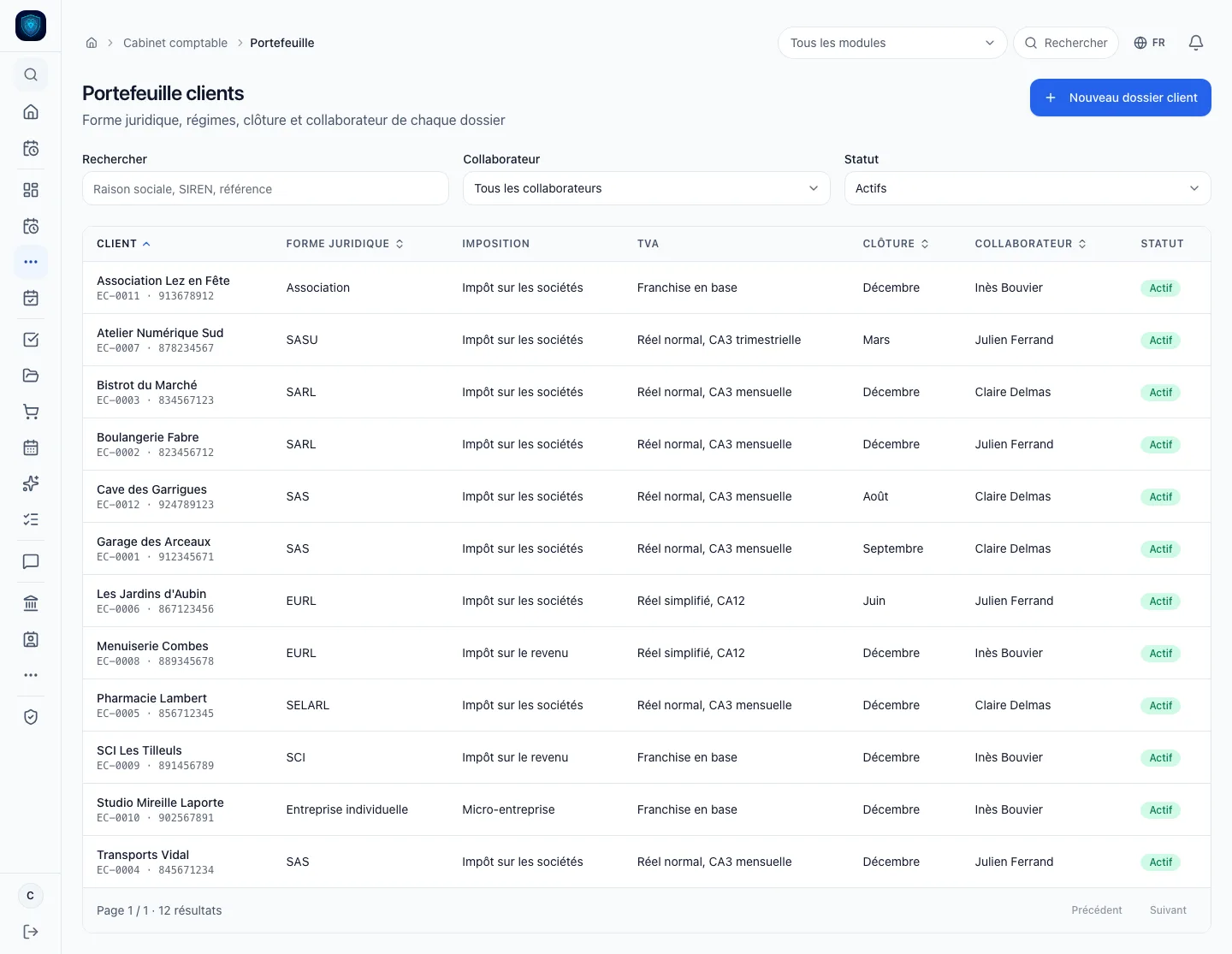
One file per client, with its regimes, its year end and its staff member.
- Client file summary Accounting firm
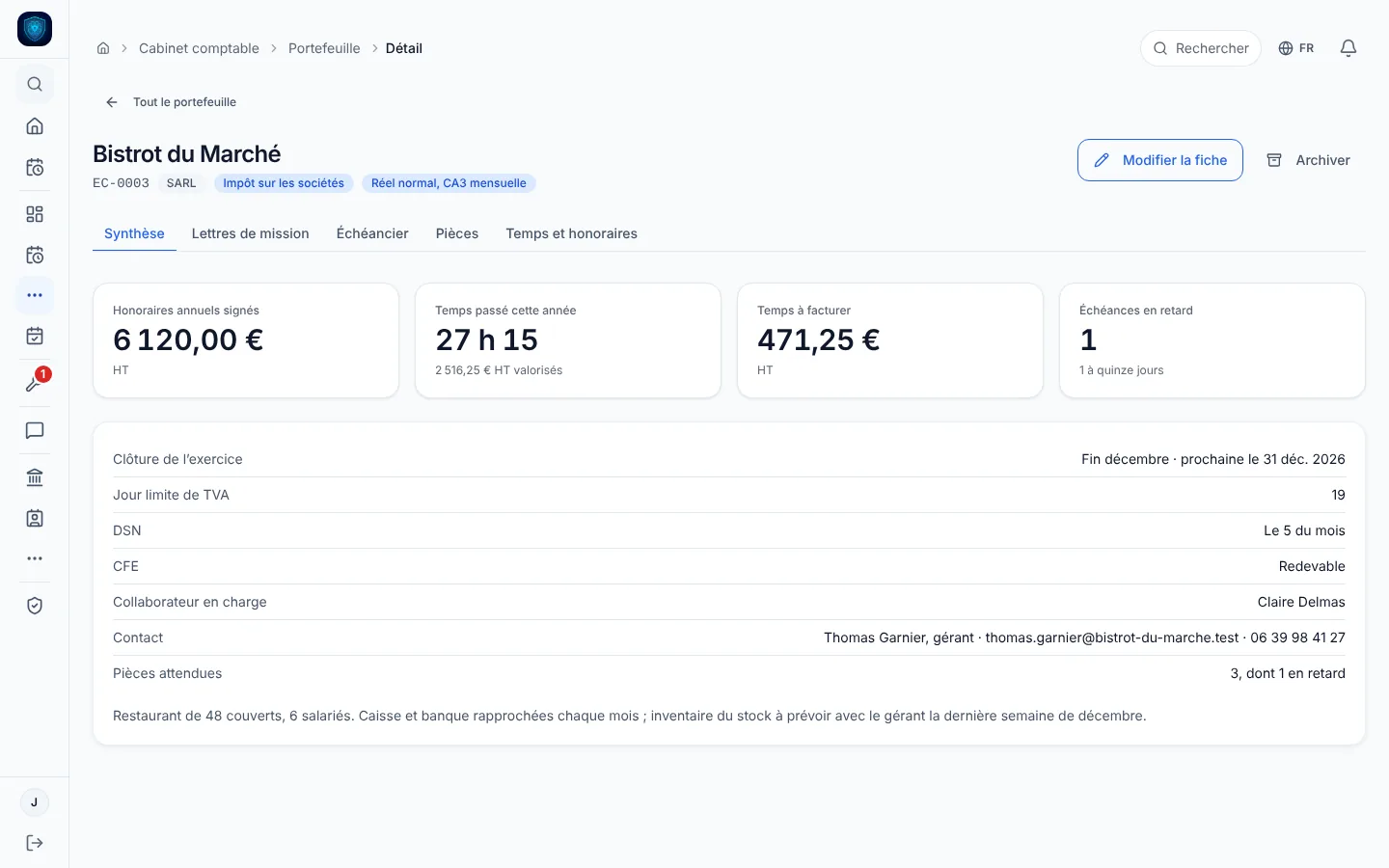
A client file summary sets signed fees, time spent, unbilled time, overdue deadlines and missing documents side by side.
- Deadlines Accounting firm
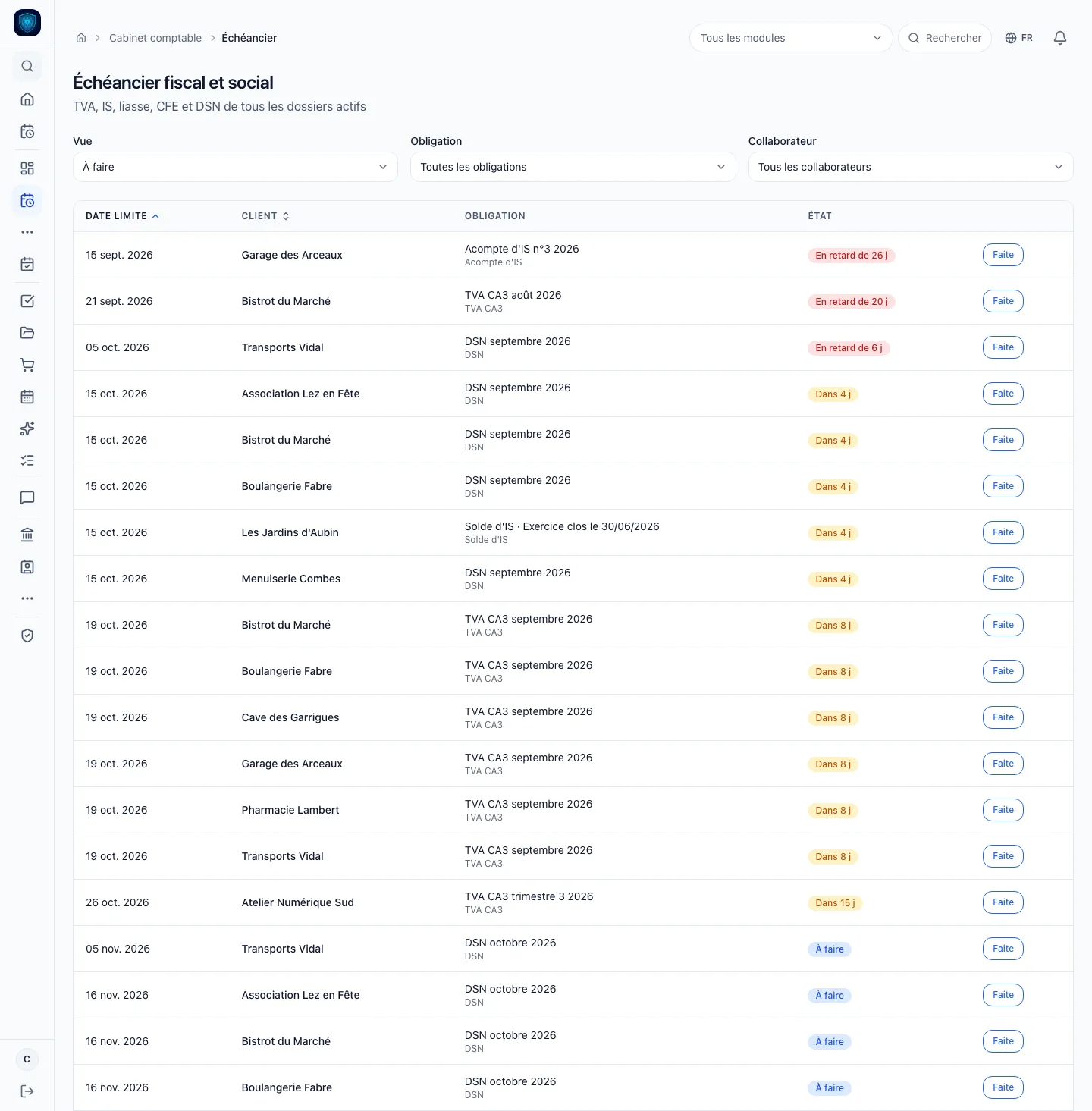
VAT, corporate tax and DSN for every file: what is late, what is coming.
- Documents Accounting firm
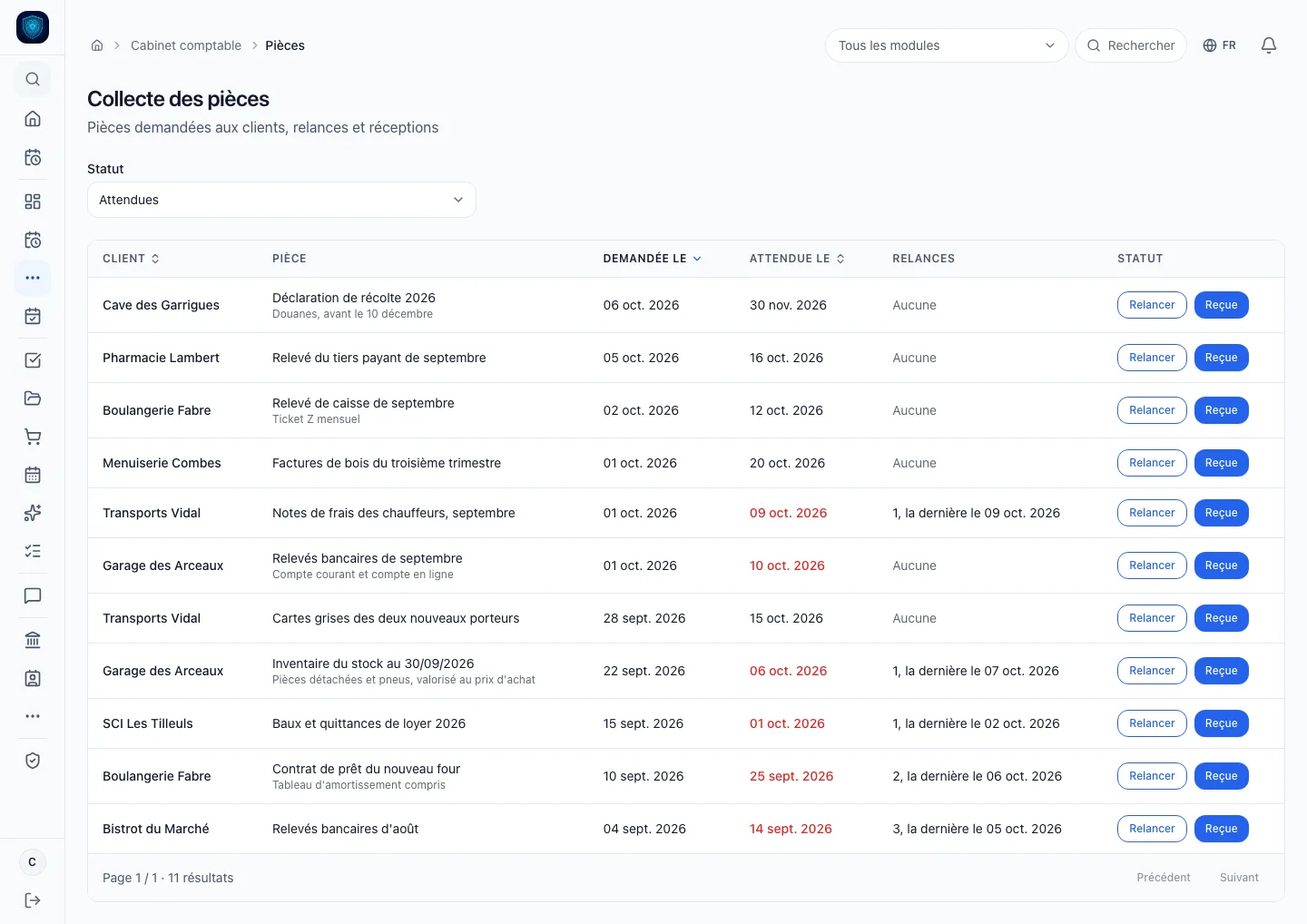
Every awaited document, its reminders counted and dated, its receipt in one click.
- Time and fees Accounting firm
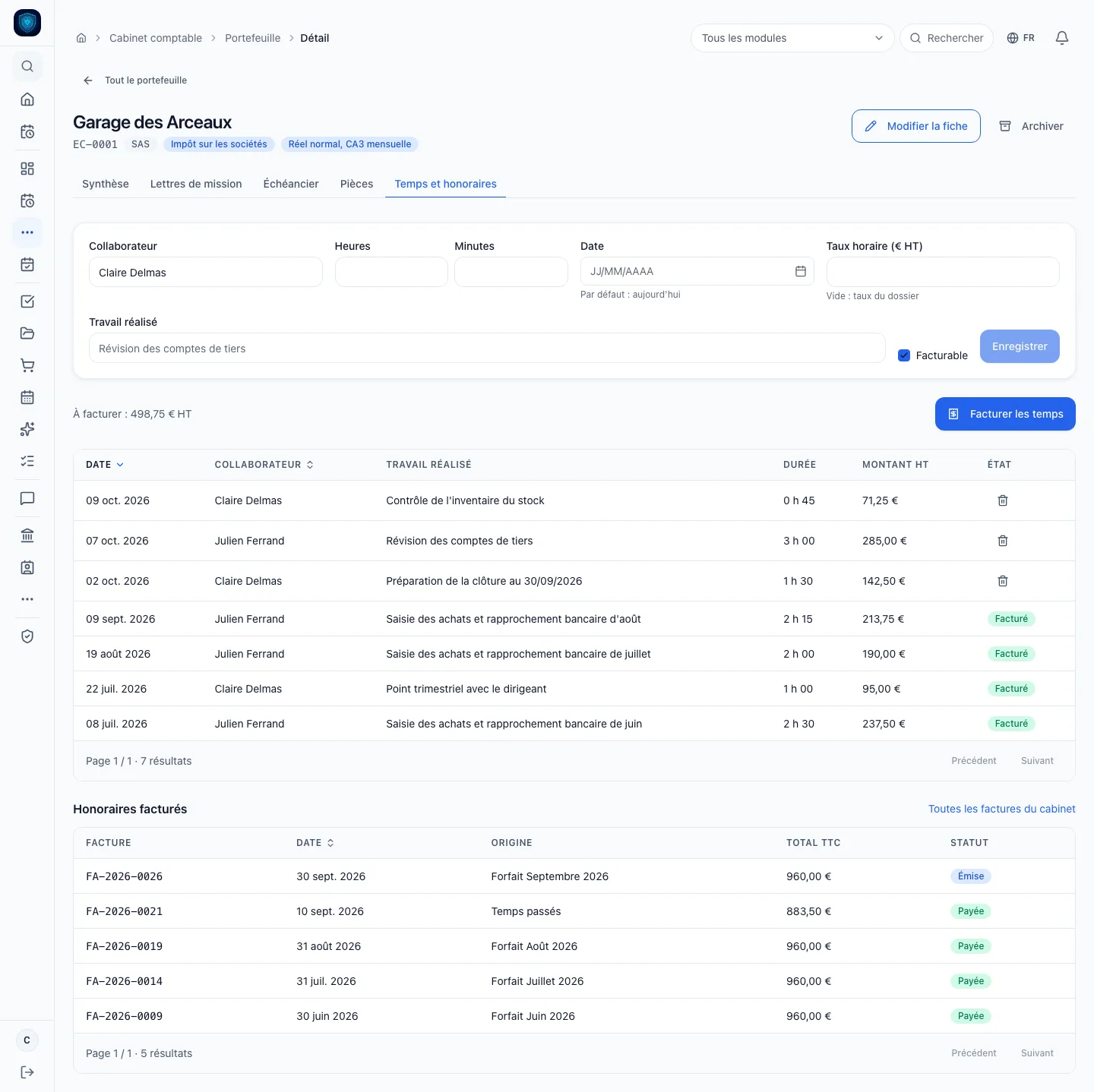
Time logged at a locked rate, billed in one click, and the file’s invoices, time or fixed fee.
Real screenshots of the software · the data is that of a demonstration instance.
Your plan
Accounting firm
5 modules tuned for this trade, switched on from day one.
- Accounting firm included
- Quotes & Factur-X invoicing
- CRM & sales
- Expenses & OCR
- Accounting & FEC
Advisory and services
Other trades in this family.
Each one has its own page, with its real screens and its price.
Where it hurts
Before, after.
-
« Every client’s deadlines live in a spreadsheet nobody keeps up to date. »
The calendar is generated from the client file.
Details
VAT regime, tax status, year end, employer, CFE: the year’s VAT, corporate tax, annual return, CFE and DSN deadlines are created in one click, moved to the next working day.
-
« A deadline slips by, and you find out from the penalty. »
Lateness shows, it is never typed in.
Details
An open deadline whose date has passed is flagged late, and those due in the next fifteen days come to the top, by obligation and by staff member.
-
« That fixed-fee client: how much time do we really spend on it? »
The file does the sums.
Details
Annual fees from signed letters against this year’s time spent, valued at each entry’s rate, time still to bill, late items and next year end: it is the file’s first tab.
-
« September’s bank statements: asked for the third time, and nobody remembers when. »
Every document keeps its reminders.
Details
Requested date, reminders counted and dated, receipt ticked off; the grouped reminder email is drafted for you and opens in your own mail client.
2 more pains we cure
-
« This client’s engagement letter: someone got it signed, probably. »
The dashboard counts the files without a signed letter.
Details
Engagement type, billing method, fees and hourly rate; draft, sent, signed or terminated.
-
« Time spent on a file never gets billed because it was never written down. »
Time becomes an invoice.
Details
Logged per staff member at a locked rate, it turns into a draft invoice in one click, just like a signed letter’s fixed fee, once per period.
In detail
Everything that ships built in.
- Accounting and tax Sage · PennylaneBeta · Chorus ProBeta
- Banking Qonto
-
Client portfolio
- Client file
- Tax status
- VAT
Details
- Client file: EC reference, legal form, SIREN, contact
- Tax status: corporate tax, income tax or micro
- VAT: monthly or quarterly CA3, CA12 or exemption
- Year end and payroll: closing month, employer, liable to CFE
- Staff member: one person in charge per file, a filter in every view
- Archiving: the file becomes read-only, nothing is deleted
-
Engagement letters
- Engagement type
- Billing
- Fees
Details
- Engagement type: bookkeeping, review, compilation, limited review, payroll, legal, advisory
- Billing: annual fixed fee, monthly fixed fee or time spent
- Fees: annual amount and hourly rate excl. VAT
- Lifecycle: draft, sent, signed, terminated
- Several letters: as many as there are engagements on one file
-
Tax and payroll calendar
- VAT
- Corporate tax
- Annual return, CFE and DSN
Details
- VAT: monthly or quarterly CA3, instalments and CA12
- Corporate tax: March, June, September and December instalments, then balance
- Annual return, CFE and DSN: placed according to the file’s regimes
- Client’s own days: VAT and DSN day entered on the file
- Working days: moved past weekends and mainland public holidays
- Manual additions: general meeting, filing of accounts
- Client taken on mid-year: only upcoming deadlines are created, past ones optional
- Generate again: adds what is missing, no duplicates, existing items untouched
- Follow-up: each deadline is ticked done, or reopened
-
Document collection
- Request
- Reminders
- Grouped email
Details
- Request: label and requested date
- Reminders: counted and dated, document by document
- Grouped email: drafted for you, opened in your mail client
- Received or cancelled: ticked off in one move
- Firm view: every awaited document, late ones first
-
Time, fees and profitability
- File summary
- Time to bill
- Next year end
Details
- File summary: signed fees against this year’s valued time
- Time to bill: the pending amount, at the top of the file
- Next year end: dated on the file, with late items and awaited documents
- Time spent: per staff member, billable or not
- Locked rate: the rate at entry stays with the time
- Bill time: unbilled time in one draft invoice
- Bill the fixed fee: annual or one twelfth, once per period
- File invoices: from time or fixed fee, period, status
- Firm invoices: the pack’s own, in Factur-X format
-
The firm itself (Freelancers pack)
- Dashboard
- Firm accounting
- Bank reconciliation
Details
- Dashboard: active files, late items, awaited documents, unbilled time
- Firm accounting: general ledger, trial balance, FEC export
- Bank reconciliation: every expense finds its line
- Expenses: local OCR of receipts, mileage scale
- CRM: prospects, proposals and history of exchanges
The math
What it replaces, and what it costs.
Typical case: independent consultant, around ten active clients.
What the plan covers
- Bookkeeping Accounting firm €140 or Indy · Abby · Dougs
- Invoicing Freebe €20 or Henrri · Evoliz · Abby
- CRM & follow-ups Pipedrive €24 or HubSpot · noCRM · Axonaut
- Expense claims Expensya €6 or N2F · Jenji · Abby
PrivateCore
Accounting firm
€114 a month
4 subscriptions, one plan.
And what the usual stack does not cover
- Factur-X & Chorus Pro
Public prices as of August to October 2026, entry-level plans, options excluded. The vendors' prices change: check their sites.
The gap
What we centralise, and they do not.
-
The deadline calendar
A calendar generated from each file’s regimes, safe to rerun with no duplicates and nothing existing touched, showing what is late and what falls due within fifteen days.
Elsewhere A shared Excel file, copied client by client every year, and reminders in Outlook.
-
Engagement letters
The letter carries its engagement, its fees and its billing method.
Elsewhere One Word template per engagement type, and the signature status in the staff member’s head.
Details
The dashboard counts the files without a signed one.
-
Collecting documents
Every document keeps its reminders, counted and dated.
Elsewhere Emails written one by one from Outlook or Gmail, with no record of how many reminders were sent or when.
Details
The grouped email is drafted for you, and receipt is ticked off.
1 more difference
-
Time spent
Logged on the file at a locked rate, it becomes a firm draft invoice in one click, then issued in Factur-X.
Elsewhere Noted in a spreadsheet or a separate time tool, then typed again into invoicing, when it is at all.
Details
The file sets it against the signed fees.
FAQ
What we get asked.
Does the Practice module cost extra?
No. It is included in the Freelancers & Consulting pack at no extra charge, and switched on at installation when you choose the accounting firm trade. You keep the pack’s invoicing, CRM, expenses and accounting.
Does it replace my accounts production tool?
No. It does not keep your clients’ books: it tracks their obligations, their documents, your engagement letters and your fees. The firm’s own accounting is the pack’s.
Are the calendar dates exact?
They follow the general rules and move to the next working day. The client’s own VAT and DSN days are entered on the file. A deadline specific to the client is added by hand with its date, and non-standard financial years, group tax regimes and event-based DSN are added that way.
Do reminders go out on their own?
No, nothing goes out on its own. The grouped reminder email is drafted for you and opens in your mail client; you send it, and the reminder is counted and dated on the document.
Who can see the portfolio fees?
Only the manager and administrator roles: the portfolio carries the fees. An archived file becomes read-only until it is reactivated.
Where do my clients’ files live?
On a Mac mini installed at the firm, so they never leave your premises. The database belongs to you and is backed up on site.